Minimal sans-serif font for clear UI and print use
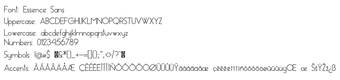
Essence Sans, published by Essence Sans, is a contemporary sans-serif typeface built to deliver clarity and minimalism across digital interfaces and printed layouts. The font supplies geometric letterforms, standard uppercase and lowercase letters, numerals, and basic punctuation in TrueType and OpenType files, optimized for legibility at display and body sizes. It installs on Windows via the .ttf/.otf context-menu install action, and suits designers, web developers, and hobbyists needing a versatile minimalist family for personal creative projects, supporting quick mockups and interface prototypes.
How the font defines clarity at multiple sizes
The font uses clean, geometric strokes that preserve character shapes from caption sizes to large display headings. That design intent anchors its claim to legibility, with explicit optimization for on-screen rendering noted in the documentation. Designers can expect consistent weight distribution and open counters, traits that keep numerals and lowercase letters distinguishable at smaller point sizes without resorting to heavier weights.
How much typographic control the font offers
The font provides a standard character set: uppercase, lowercase, numerals, and basic punctuation only. There is no mention of extended glyph sets, stylistic alternates, or variable weights in the base distribution, which limits typographic tuning. For projects requiring special symbols, diacritics, or multiple language scripts, the font's base package likely requires supplementation or a different family.
Is installation and day-to-day use practical on Windows?
Installation follows the familiar Windows workflow: locate the .ttf or .otf file, right-click and choose Install, after which the font appears in application menus. That behavior means the font integrates with common editors without extra tooling. Using it in desktop applications like word processors and design suites requires no additional steps beyond the standard font selection interface.
Does the font integrate with common apps and rendering pipelines?
The font is distributed in TrueType/OpenType formats, which are widely supported by office suites and creative software. The package notes explicit optimization for digital screens, which reduces the need for manual hinting in typical desktop workflows. For print work, designers should test PDF exports to confirm glyph fidelity across the target applications since the font carries a compact, single-family scope rather than extensive print-specific variants.
Practical choice for single-language design tasks
The font is a pragmatic option for designers and hobbyists who need a minimalist sans-serif for UI mockups, branding drafts, and small-scale editorial work. Its limited glyph inventory makes it less suitable for projects that require broad language coverage or specialized symbols, and commercial licensing is typically handled separately. Practical tip: review the character map in your target application before committing the font to high-volume or multilingual output.
Pros
Clean geometric letterforms that maintain clarity across sizes
High legibility for both display and body text use
Distributed as TrueType/OpenType for standard application support
Installs via Windows context-menu for quick integration
Cons
Base character set limited to standard alphanumerics and basic punctuation
No extended glyphs or stylistic alternates in the base package
Commercial use typically requires separate licensing arrangements
Laws concerning the use of this software vary from country to country. We do not encourage or condone the use of this program if it is in violation of these laws. Softonic may receive a referral fee if you click or buy any of the products featured here.